Network Topology
OSI = Open Systems Interconnection
The OSI model is a conceptual model that characterises and standardises the communication functions of a telecommunication or computing system.
It divides computer network architecture into 7 layers.
- Higher layers cover network requests/responses, and represent data in meaningful ways.
- Lower layers deal with electrical signals, binary data and routing data across networks.
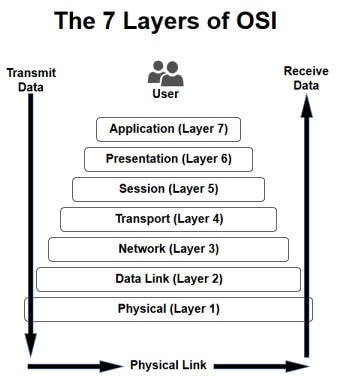
- Application Layer - some application designed to be used by an end-user (e.g: SSH, FTP, SMTP, HTTP(S), DNS)
- Presentation Layer - Provides common data abstractions to allow communication between two computers. Also does data encryption. (Note: this layer is not used now)
- Session Layer - a conversation between two computers. Performs dialogue control, token management, data synchronisation. (Note: this layer is not used now.)
- Trarnsport Layer - decides how much data will be passed through. Encapsulates packets into segments. This is about security and validity. Scans the data to check for errors. Capable of error recovery, flow control, and re-transmission. Data that is not recovered from an error will not pass through, and may be destroyed.
- Network Layer - encapsulates the data into separate 'packets'. Also determines the best, most reliable, fastest route to deliver some data. (Routers are involved in this layer). The network layer also adds a source and destination IP address to each packet.
- Data Link Layer - switches operate on this layer. Packets are turned into 'frames', and error-free data transfer of the frames is provided, over into the Physical Layer. MAC addresses!
- Physical Layer - responsible for the transmission of digital data bits. Uses physical medium like copper cable, fibre optic cable, WiFi, Ethernet or infrared.
As you travel down the OSI model, you add headers to each layer:
Since layers 6 and 5 are no longer used, we will not be studying these layers in this module.
Instead, we are studying layers 1, 2, 3, 4 and 7
Identifying network problems with the OSI model:
- If your computer is not connected to the network => Application Layer problem
- If a cable gets cut, or is mis-wired => Physical Layer problem
- If you put in the wrong IP address => Network Layer problem
- If the router dies => Network Layer problem